- RenderWare->Advanced Settings
- Select the Connections tab
- Select a local connection for D3D8 or OpenGL. Local D3D8 and OpenGL connections will automatically spawn viewers and close them on disconnection.
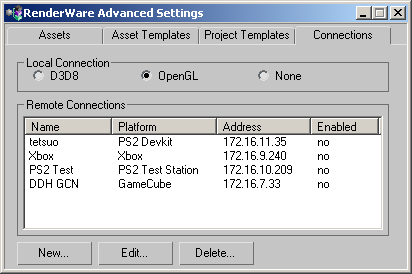
viewers/visual in the RenderWare Graphics directory.
The RenderWare Visualizer suite of applications consists of:
launcher.exe - the launcher loads exported resources control.exe - the control panel sets options for viewing exported files
 © 1993-2004 Criterion Software Limited. All rights reserved. Built Thu Feb 12 13:46:59 2004.
Send Feedback
© 1993-2004 Criterion Software Limited. All rights reserved. Built Thu Feb 12 13:46:59 2004.
Send Feedback