RpAName.c. We will implement them fully in a moment.
    static RwStream *
    rpStreamWrite(RwStream *stream, RwInt32 len,
                  const void *data, RwInt32 offset, RwInt32 size)
    {
        return stream;
    }
    static RwStream *
    rpStreamRead(RwStream *stream, RwInt32 len,
                 void *data, RwInt32 offset, RwInt32 size)
    {
        return stream;
    }
/* no data to write */ return 0; }
RwInt32 RpAtomicNameInitialize(void) { rpExtensionOffset = RpAtomicRegisterPlugin(sizeof(char *), MAKECHUNKID(rwVENDORID_CRITERIONTK, rwID_EXAMPLE), rpConstructor, rpDestructor, NULL); RpAtomicRegisterPluginStream(MAKECHUNKID(rwVENDORID_CRITERIONTK, rwID_EXAMPLE), rpStreamRead, rpStreamWrite, rpStreamGetSize); /* return the offset */ return (rpExtensionOffset); }
Now we need to implement the read, write and get size functions.
rpStreamGetSize() function. If the atomic has a name, then return the length of the name in bytes, plus one for the zero string terminator. If there is no name, simply return zero.
static RwInt32 rpStreamGetSize(const void *data, RwInt32 offset, RwInt32 size) { char **extData = RPEXTFROMATOMIC(data); if (*extData) { return rwstrlen(*extData) + 1; }
        /* no data to write */
        return 0;
    }
rpStreamWrite() function to write the name to disk. Use the RwStreamWrite() API function which writes bytes to the stream. The callback contains the size (number of bytes) computed by rpStreamGetSize(). You should write this number of bytes to the stream.
rpStreamRead() function. This is slightly more complex in that we must call RwMalloc() to create the space into which the data will be stored. Again, the size argument to the callback is the number of bytes of memory we must allocate. Make the extension data point to this RwMalloc'd memory. If the memory allocation fails, simply store a NULL into the extension data.
    static RwStream *
    rpStreamRead(RwStream *stream, RwInt32 len,
                 void *data, RwInt32 offset, RwInt32 size)
    {
        char **extData = RPEXTFROMATOMIC(data);
        char  *name    = RwMalloc(len, rwID_NAOBJECT);
        if (name)
        {
            RwStreamRead(stream, name, len);
            *extData = name;
            return stream;
        }
        /* no name to read, or problem with memory */
        *extData = NULL;
        return stream;
    }
To test our stream reading and writing routines we need a function that will write the picked atomic to disk. We will add this code to utils.c, and add a new menu item that calls this new function.
utils.c. This simply obtains the clump that the atomic is contained in and writes it to disk with the filename specified. Modify the header file accordingly.
    void
    DffSave(RpAtomic *atomic, char *filename)
    {
        if (atomic)
        {
            RwStream *stream = RwStreamOpen(rwSTREAMFILENAME, rwSTREAMWRITE, filename);
            RpClump  *clump  = RpAtomicGetClump(atomic);
            if (stream && clump)
            {
                RpClumpStreamWrite(clump, stream);
                RsWarningMessage("Wrote model!");
                RwStreamClose(stream, NULL);
            }
            else
            {
                RsWarningMessage("Couldn't open stream!");
            }
        }
        else
        {
            RsWarningMessage("No atomic to export!");
}
}
main.c create a new trigger menu item and callback to handle the saving of the atomic. The callback should be called saveAtomicTrigger() and for the moment just provide a default filename such as saved.dff. Later we will change the filename.
if (PickedAtomic && !check)
{
DffSave (PickedAtomic, "models/saved.dff");
}
return TRUE;
}
static RwBool InitializeMenu(void) { static RwChar fpsLabel[] = RWSTRING("FPS_F"); static RwChar nearLabel[] = RWSTRING("Near Clip"); static RwChar farLabel[] = RWSTRING("Far Clip"); static RwChar showPosLabel[] = RWSTRING("Show Position"); static RwChar namesLabel[] = RWSTRING("Name Choice"); static RwChar assignLabel[] = RWSTRING("Assign Name"); static RwChar saveLabel[] = RWSTRING("Save"); if( MenuOpen(TRUE, &ForegroundColor, &BackgroundColor) ) { MenuAddEntryBool(fpsLabel, &FPSOn, NULL); MenuAddEntryReal(nearLabel, &NearClip, NULL, 0.1f, 10.0f, 0.1f); MenuAddEntryReal( farLabel, & FarClip, NULL, 10.0f, 100.0f, 1.0f); MenuAddEntryBool(showPosLabel, &ShowPos, NULL); MenuAddEntryInt(namesLabel, &SelectedName, NULL, 0, NUMNAMES-1, 1, AtomicNames); MenuAddEntryTrigger(assignLabel, assignNameTrigger); MenuAddEntryTrigger(saveLabel, saveAtomicTrigger); return TRUE; } return FALSE;
}
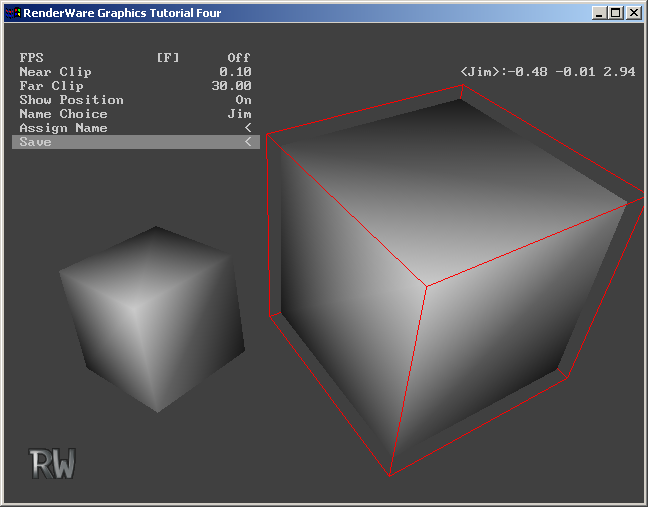
saved.dff) onto the application. Check that the name has been kept. In the illustration below, the left-most cube has been given the name "Jim". The atomic has then been written to disk, and loaded into the application (cube on the right). This selected atomic is correctly called "Jim".
Finally we will modify the save function to use the name of the atomic as the filename.
saveAtomicTrigger() function use RenderWare Graphics string functions to create a name for the atomic, based on the string returned from RpAtomicNameGetName(). If no name is available then save the model with a default name such as noname.dff.
    static RwBool
    saveAtomicTrigger(RwBool check)
    {
if (PickedAtomic && !check) { const RwChar *name = RpAtomicNameGetName(PickedAtomic); if (name) { RwChar s[100]; RsSprintf(s, "%s.dff", name); DffSave(PickedAtomic, (RwChar *)s); } else { DffSave(PickedAtomic, "noname.dff"); } } return TRUE;
}
